7 Reasons to Consider Replacing Your Indoor Light Bulbs With Smart Ones
Learn seven practical reasons to switch indoor light bulbs to smart LEDs, from automatic shutoff and lower energy use to better routines, comfort, and security.
If your current bulbs are already LEDs, a smart bulb will not magically make the light itself more efficient. The real upgrade is control: you can decide when a room is lit, how bright it is, what color temperature it uses, and what happens when you are not home.
That distinction matters. The best case for smart bulbs is not that every socket needs an app. It is that a few high-use lamps and easily forgotten fixtures can become more useful, more consistent, and less wasteful without opening a wall or replacing a hardwired fixture. The U.S. Department of Energy explains that LEDs can use up to 90% less energy and last up to 25 times longer than traditional incandescent bulbs, but the smart features determine whether your household actually uses that efficiency well.
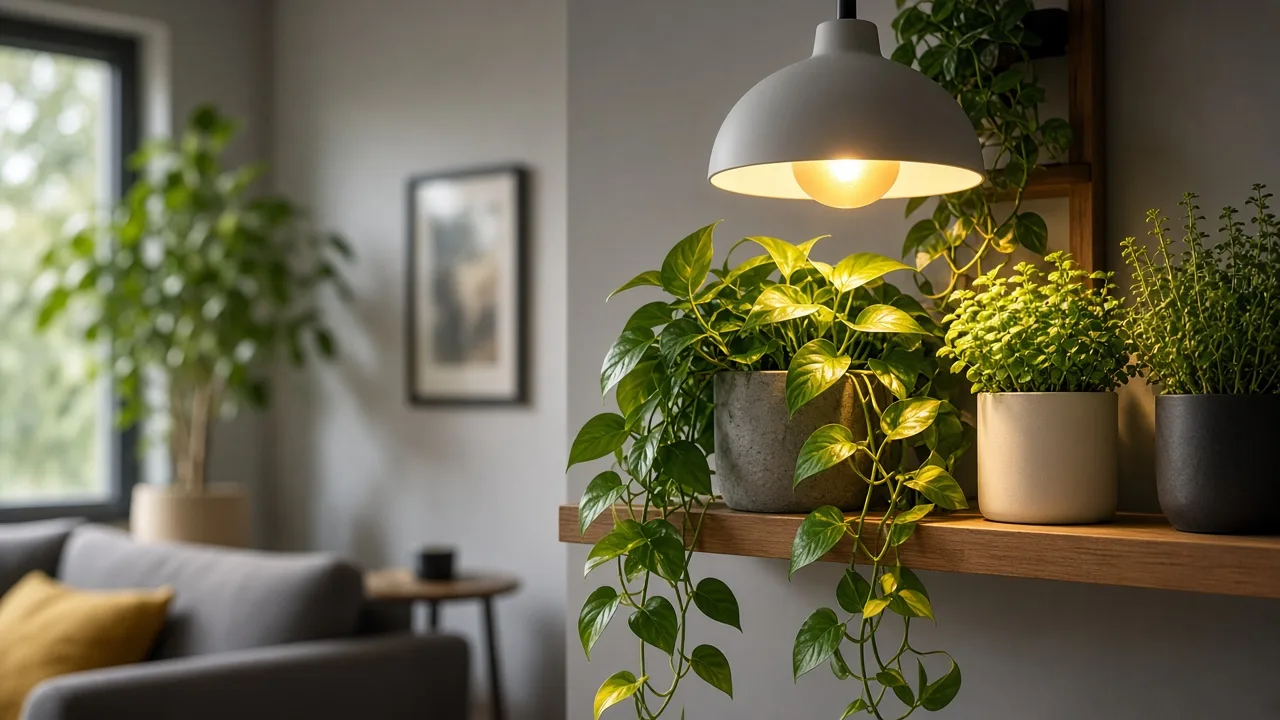
Warm and cool light can serve different tasks in the same room—the color-control advantage of a smart bulb.
Smart Bulbs vs. Regular LEDs: What You Actually Gain
A smart bulb is usually an LED bulb with a wireless radio, onboard controls, and an app or platform connection. Depending on the model, you may control it from a phone, voice assistant, hub, motion sensor, schedule, or local smart-home routine. A regular LED gives you efficient illumination; a smart LED adds programmable behavior.
That behavior is valuable in places where lighting is easy to forget or awkward to reach: a porch lamp, a bedside table, a basement stair, a child’s room, or a living-room lamp you want to turn off after falling asleep. Practical smart-home coverage from MakeUseOf also highlights group control, schedules, voice commands, and adjustable brightness as the everyday features people use most. It is less valuable in a closet you open twice a week or a socket controlled by a switch everyone remembers to use.
Think of smart bulbs as small, reversible automation upgrades. You keep the fixture, change the bulb, and can take the bulb with you when you move. You also accept a little more complexity, a small standby load while the bulb remains powered, and the possibility that an app, network, or cloud service will eventually need attention.
1. Lower Energy Use Starts With the LED, Not the App
The first reason to replace an incandescent or halogen bulb is efficiency. Smart bulbs are overwhelmingly LED-based, so they can deliver the brightness you need with substantially less power and a much longer rated life. The smart layer can add savings by dimming lights or turning them off, but it is not the source of the LED’s basic efficiency.

The Energy Information Administration lists lighting as a year-round home energy use, while also noting that heating and air conditioning account for far more household energy in many homes. That is useful perspective: smart bulbs will not transform a high heating bill, but they can make a repeatable dent in lighting that runs for hours every day.
The math is easiest when you compare actual watts and runtime. An 8-watt LED used for four hours a day consumes about 11.7 kilowatt-hours per year; a 60-watt incandescent used the same way consumes about 87.6 kilowatt-hours. Your electricity rate determines the cost, but the comparison shows why replacing a frequently used incandescent makes more sense than buying a smart bulb for an almost-never-used fixture.
If you already have efficient LEDs, estimate the smart feature’s value separately. A schedule that cuts one forgotten 10-watt bulb from eight hours to two hours each night saves runtime; it does not create a second dramatic efficiency gain. In that situation, buy a smart bulb for control, accessibility, or routines—not because the word “smart” guarantees a lower bill.
2. Automatic Shutoff Stops Waste at the Source
The most practical smart-light routine is also the least glamorous: turn the light off when it no longer needs to be on. A bedtime schedule can shut down bedside lamps, a sunset-to-sunrise rule can manage an entryway, and a motion-triggered routine can keep a basement or laundry room from glowing for hours after everyone leaves.

Set the routine around what your household actually does, not an imaginary perfect schedule. If someone reads until 11:30 p.m. on weekdays but stays up later on Friday, use a later Friday shutoff or a voice override. A rigid schedule that interrupts real life will be disabled; a flexible one becomes background infrastructure.
There is one important catch: most smart bulbs need the wall switch left on so the bulb remains powered. If someone turns that switch off, the app cannot reach the bulb, and the scheduled behavior appears to have failed. Put a small reminder near the switch during the first week, or choose a smart switch or button if your household strongly prefers physical controls.
3. One Tap Replaces a Tour of Every Room
Smart bulbs are most noticeable when you control several lights together. A single “good night” scene can turn off the living room, dim the hall, and leave a low bedside light on. A “leaving” scene can shut down the main floor without sending you back upstairs to check each fixture.

This is more than a lazy convenience. Group control is useful for anyone with limited mobility, a temporary injury, a sleeping baby, or a home layout where switches are badly placed. Voice control can also help when your hands are full, although you should keep a physical fallback for network outages and guests who do not use your platform.
Start with one room rather than pairing every bulb in the house at once. Name groups according to location and action—“living room lamps,” “hall,” or “all downstairs”—instead of creating a long list of identical “bulb 1” and “bulb 2” devices that becomes confusing after a month.
4. Brightness and Color Temperature Fit the Job
A fixed bulb forces one light level and one color into every situation. A smart bulb can dim for a movie, brighten for cleaning, shift warmer for evening, or provide a cooler white when you need to read labels, prep food, inspect a craft, or find a dropped earring.

Treat lumens and Kelvin as separate decisions. Lumens describe how much visible light the bulb produces; watts describe the electricity it uses. Kelvin describes the appearance of white light: lower numbers look warmer and more amber, while higher numbers look cooler and more blue-white. If a package says “60-watt equivalent,” check the actual lumen and watt figures instead of assuming it consumes 60 watts.
Color-changing RGB scenes are optional decoration. For everyday rooms, tunable white—a controllable range from warm to cool white—often delivers more useful value than millions of saturated colors. If color accuracy matters in a kitchen, bathroom, closet, or art area, also check the bulb’s CRI or color-rendering information rather than assuming every bright white setting will show colors faithfully.
The Kelvin range matters more than the marketing word printed on the box.
Build Three Useful Scenes Instead of Chasing Novelty
You do not need a dozen elaborate scenes. Start with three that solve real problems:
- Focus: a brighter, neutral or cool white for desk work, cooking, laundry, or plant inspection.
- Relax: a dimmer warm white for conversation, television, or the hour before bed.
- Away: a small group of lamps that turns on and off within a natural-looking time window.
Give each scene a manual control and a schedule only after you have used it for a few days. If a setting feels harsh, adjust the brightness before changing the whole bulb. A smart bulb is useful when it reduces decisions, not when it adds a new hobby of endlessly tweaking color sliders.
5. Routines Make Mornings and Bedtime Easier
Smart bulbs can turn a sequence of small actions into one predictable cue. A gradual morning ramp can bring a room from dim to bright before an alarm, while a warm, lower-brightness evening scene can make it easier to stop using the overhead light when you are winding down.

Keep the claim practical rather than medical. Warmer, dimmer light may feel more comfortable at night, but a bulb is not a treatment for insomnia or a substitute for habits that support good sleep. If bright light or color changes bother you, use a simple low-brightness warm schedule and disable transitions.
Routines also help with household logistics. Turn the entry light on shortly before the first person usually arrives, illuminate the hallway when a motion sensor detects movement, or turn a child’s reading lamp off after a reasonable window. These small actions are valuable because they happen consistently even when nobody remembers to initiate them.
6. Away Modes Make an Empty Home Look Lived In
An indoor lamp that switches on at the same time every night is better than a dark house, but it can look predictable. Smart lighting can vary the start and stop times, alternate between a living-room lamp and a bedroom lamp, and create the impression of ordinary movement through the home.

Wirecutter’s reporting on smart lighting describes this as a more flexible alternative to leaving one light on continuously: schedules can be randomized, grouped, or tied to other devices. Use that feature as a presence signal, not a security system. It cannot lock a door, detect every intruder, or replace an alarm, camera, or trusted neighbor.
Keep away routines simple enough to survive an internet outage. If your bulb supports local control or your hub can run the automation locally, configure that behavior. If it depends on a cloud service, test what happens when the router is offline and make sure the lights fail in a way you can live with.
7. Smart Bulbs Add Flexibility Without Rewiring
Replacing a bulb is one of the least disruptive ways to add automation to a rental, older home, or room where a new switch would be expensive. You can change one table lamp without calling an electrician, move the bulb to a different compatible fixture later, and remove it if the experiment does not suit the room.

That reversibility is especially useful when you are unsure which control style your household will tolerate. Try a bedside lamp, living-room lamp, or entry fixture first. After a week, ask whether the schedule was used, whether anyone missed a physical switch, and whether the app connection was dependable. The answer is more informative than a product feature list.
Smart bulbs can also grow with a home. A basic bulb may start as a phone-controlled lamp, then join a voice routine, motion sensor, or broader platform later. The upgrade is not future-proof by default, but buying a bulb with a clear ecosystem path can reduce the need to replace it when your smart-home setup changes.
What Smart Bulbs Cannot Fix
Smart bulbs are a poor solution when the real problem is the fixture, wiring, or room layout. A bulb cannot correct a loose socket, a failing switch, a bad neutral connection, a fixture that traps too much heat, or a lamp that is simply in the wrong place. Flickering across multiple bulbs is a reason to stop and investigate the electrical system rather than keep buying new app-controlled lamps.
They also do not automatically improve light quality. A low-CRI bulb can still make food, clothing, artwork, or plant foliage look wrong. A 1,600-lumen bulb can still create glare if it is placed at eye level, while an 800-lumen bulb can feel inadequate in a high-ceilinged room. Control is not a substitute for choosing the right output, beam, and placement.
Finally, a smart bulb is not always the right device. A smart plug may be better for a lamp that uses a non-replaceable bulb, while a smart switch is better when you want physical control over a whole fixture or circuit. Choose the device that fits the electrical job instead of forcing every lighting problem into a bulb-shaped solution.
Choose the Right Bulb Before You Order
The cheapest way to avoid a bad smart-bulb purchase is to photograph the old bulb and fixture label before shopping. Record the base, shape, approximate brightness, color temperature, whether the fixture is enclosed, and whether a wall dimmer is involved. Those details narrow the options faster than scrolling through app screenshots.
Match the Socket, Shape, Lumens, and Fixture
An E26 base is the common medium screw base in many lamps, while A19 describes the familiar bulb shape. They are not interchangeable labels: a bulb can have the correct base and still be too long, too wide, or the wrong shape for the shade. Check the fixture clearance and the package dimensions, especially for smart bulbs with larger electronics housings.
Match brightness by lumens, not by the watt-equivalent headline. Around 800 lumens is a common general-purpose target, while larger rooms, high ceilings, or work surfaces may need more output or multiple bulbs. Dimming can make a bright bulb more flexible, but it cannot make a bulb brighter than its maximum output.
Check the fixture notes carefully. Many smart bulbs are not suitable for fully enclosed fixtures unless the manufacturer says they are. Damp and outdoor locations need the correct fixture and bulb ratings, and an indoor-rated smart bulb should not be placed in an exposed porch socket simply because the app offers an outdoor scene.
Compare actual wattage and form factor before buying a smart bulb for a specific fixture.
Decide Between Wi-Fi, Bluetooth, Hub, and Matter
Wi-Fi bulbs connect directly to your router and are often the simplest no-hub option. They can be convenient for a few bulbs, but a crowded network, a weak signal, or a 2.4 GHz-only setup can make pairing frustrating. Confirm the app’s network requirements before buying.
Bluetooth bulbs are useful for local phone control and small spaces, but range and remote access vary. A hub-based system can coordinate many bulbs on a separate mesh network and may be more reliable at scale, but it adds cost and another device to maintain.
Matter is a compatibility standard, not a guarantee that every feature works everywhere. The Connectivity Standards Alliance describes Matter as an IP-based standard intended to improve secure, reliable interoperability across brands, using technologies such as Wi-Fi and Thread with Bluetooth Low Energy for setup. Check the exact bulb, controller, and feature list: a Matter badge may cover on/off and dimming while advanced color effects or manufacturer scenes remain app-specific.
Use the ecosystem you already understand. If everyone in the home uses Apple Home, choose a bulb that supports it; if the household is built around Alexa or Google Home, verify that platform. A single reliable ecosystem is usually better than a bargain bulb that requires a separate app nobody opens.
Installation That Prevents Most Frustration
Install the bulb with the wall switch off, screw it in gently, restore power, and follow the manufacturer’s pairing sequence while standing near the fixture. Do not start by installing ten bulbs in ten rooms. Pair one, rename it clearly, update its firmware, create one schedule, and test both app control and ordinary wall-switch behavior.
Start with one frequently used lamp, then expand after the schedule proves useful.
If the bulb will not pair, check the basics in order: the fixture has power, the phone is on the required Wi-Fi band, Bluetooth and location permissions are enabled for setup if requested, the bulb is close to the router or hub, and the bulb has been reset according to its instructions. Avoid repeated factory resets until you know whether the issue is the bulb, the network, or the app account.
Be careful with wall dimmers. A smart bulb usually expects steady full power and performs its own dimming electronically. Putting it behind an incompatible dimmer can cause flicker, buzzing, dropouts, or damage. Use a regular on/off switch, a listed smart dimmer and compatible bulb combination, or a smart switch that is designed for the fixture.
Privacy, Security, and Reliability Checklist
Any connected device adds another account, app, firmware path, and network relationship to your home. That is not a reason to avoid smart bulbs, but it is a reason to choose products from companies that provide updates and to avoid treating a bargain app as harmless by default.
Before you install several bulbs:
- Create a unique password for the lighting account and enable two-factor authentication if offered.
- Update the bulb, hub, app, and router firmware before building complicated routines.
- Review permissions and disable access the app does not need for your use case.
- Prefer local control or a hub that continues basic routines when the internet is down.
- Put inexpensive connected devices on a guest or IoT network if your router supports network separation.
- Keep a physical switch, button, or reset plan available for guests and outages.
- Delete old devices from the account before giving them away or moving them to another home.
Also consider the reliability cost of always-on power. A smart bulb that loses power at the wall is offline, and a bulb that returns to full brightness after an outage may be unpleasant at 3 a.m. Look for a power-restore setting if that behavior matters, then test it before relying on the bulb for a nursery, stairway, or security routine.
Are Smart Bulbs Worth It for Your Home?
Replace your indoor bulbs with smart ones when you have a specific control problem: lights are routinely left on, switches are difficult to reach, one room needs several lighting modes, you want an arrival or bedtime routine, or you are building an interoperable smart-home system. Start with one to three high-use fixtures and measure whether the automation actually becomes part of daily life.
Skip the upgrade when the bulb is rarely used, the Wi-Fi is unreliable, the fixture needs a specialty shape that smart bulbs do not offer, or everyone in the household prefers a simple switch. If your current bulbs are already efficient LEDs, a new smart bulb is a convenience purchase with possible runtime savings—not an automatic bill-cutting guarantee.
The strongest starter setup is usually boring: one warm-to-neutral tunable bulb in a living-room or bedside lamp, a reliable off schedule, a clear group name, and a physical fallback. Once that works, add a motion trigger or away routine. This staged approach makes it obvious whether you are buying genuine usefulness or just adding another app to your phone.
Conclusion
Smart bulbs earn their place indoors when they solve repeatable problems. LED construction can reduce energy use and replacement frequency, while schedules, group control, dimming, tunable white light, away routines, and reversible installation make the room easier to operate.
The upgrade is not universal, and the trade-offs are real: standby power, network dependence, app maintenance, privacy questions, dimmer conflicts, and fixture restrictions. Choose by the job the bulb must do, match the physical and electrical requirements first, and automate one high-friction light before committing to the whole house.